Cloud, Data & AI
OCR and AI Document Processing: What Accuracy to Expect and How to Get It
Invoices, delivery notes, forms and contracts can be read by machine with very high accuracy — if the pipeline is built around validation and review rather than blind trust. Here is how it works.
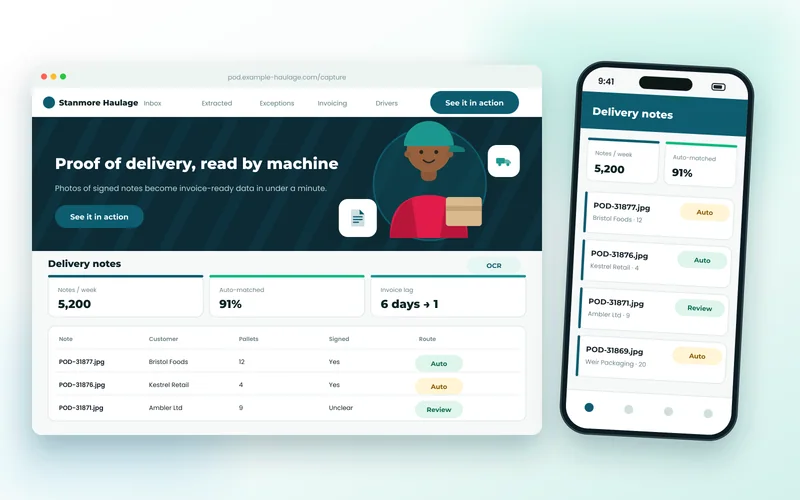
Ten years ago OCR meant a scanner and a lot of correction. Today a photo of a crumpled delivery note taken in the back of a van can be read, checked and posted to an accounting system in under a minute. The technology has moved on; what has not changed is that a pipeline built on the assumption that extraction is perfect will fail. The good ones assume it is not.
Two Kinds of Reading
Classic OCR turns pixels into characters. Document AI goes further: it understands that a document is an invoice, that this number is the total and that one the VAT, that these rows are line items. The cloud services from Microsoft, Google and Amazon do this well on common document types, and language models can be pointed at the unusual ones. Our OCR and document processing service uses whichever fits the document and the data-residency rules.
What Accuracy Is Realistic
On typed invoices, the fields that matter — supplier, date, invoice number, totals — are read correctly well over 95% of the time. Line items on unusual layouts are harder. Neat handwriting reads well; cursive is a gamble. Photos are worse than scans until they are cleaned up, and cleaning up (straightening, removing shadows, boosting contrast) often improves results more than switching models.
The honest answer for any particular business is found by testing on its real documents, which is how every engagement of ours starts.
Why Validation Matters More Than the Model
A 97% field accuracy sounds excellent until you multiply it across a month of invoices and realise that dozens of wrong totals would have reached the ledger. The pipeline has to check its own work:
- Do the line items add up to the total?
- Is the supplier one we know, and does the invoice number look like theirs?
- Is the date plausible? Is this a duplicate?
- Does the pallet count match what was planned for delivery?
Documents that pass go straight through. Documents that fail — or where the model's confidence is low — go to a review queue showing the image and the extracted fields side by side, where a person fixes one field in seconds rather than typing the whole thing.
What It Looks Like in Practice
For a haulage company, photographed proof-of-delivery notes are cleaned, read, checked against the planned delivery and matched to invoices; 91% never need a human, and invoicing moved from six days behind to one. For an accountancy practice, 18,000 supplier invoices a month are read and posted with the same pattern. Both are ordinary Python services behind the scenes, connected to existing systems through their APIs.
Data Residency and Privacy
Cloud document services can be pinned to a region, and for documents that must never leave your infrastructure we run open-source OCR on your own servers. Retention is set by you: many clients keep the extracted data and delete the images after a fixed period.
Starting Small
The best first project is one document type feeding one system — supplier invoices into your accounting package, say. That takes two to four weeks including testing on your documents, and the framework it leaves behind makes the second document type much quicker. It also sits naturally alongside broader AI integration work, since the same models that read documents can classify and route them.
If you have a pile of documents someone is typing in by hand, send us a few samples and we will tell you what accuracy to expect before you commit to anything.