
AI Chatbot & Website Assistant
AI Chatbot for Your Website: Answers, Quotes and Leads, 24 Hours a Day
An assistant that knows your services, answers real questions, quotes from your prices and captures enquiries while you sleep. Try ours — it is in the corner of this page.
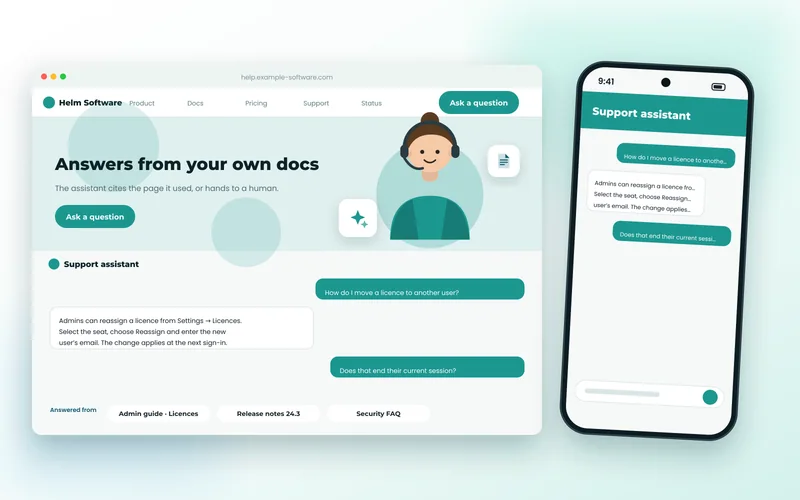
A Website Employee, Not a Widget
Most website chatbots are a frustration: a scripted menu that cannot answer anything real, or a generic AI that confidently invents your prices. The assistant on this site is neither. It answers from our actual services and articles, recognises the problems customers describe, quotes ranges from our real pricing, and captures the details our team needs — then hands over to a person when that is the right thing to do.
We build the same for your business. It runs on your own content and rules, so it says what you would say, it never makes up a price, and every conversation lands in your admin as a lead with the transcript attached.
What’s Included
What Your Assistant Can Do
Answers From Your Own Content
Grounded in your services, FAQs and articles, so answers are accurate and specific to you — with a link to the page that says more.
Recognises Problems & Quotes
Understands "my checkout is broken" or "I need a booking system", gives a price range from your own rate card and explains what happens next.
Captures Qualified Leads
Collects name, contact details and the answers your team needs, in the right order, and files them with the full transcript.
Knows When to Hand Over
Existing clients, urgent problems and anything it is unsure about go to a human — by email, ticket or live handoff.
Your Tone, Your Rules
What it will and will not say, how it greets people, what counts as urgent — configured, not left to chance.
Private & Hosted for You
Runs on your infrastructure or ours, with no conversation data sent to a third-party chat platform.
Benefits
What It Does for the Business
- Enquiries captured at 11pm and on weekends, when most visitors actually browse.
- Fewer repetitive emails: the common questions are answered instantly and correctly.
- Better leads: visitors arrive at your team already qualified, with the transcript.
- No invented prices or promises — it only says what your content and rules allow.
- Improves over time: unanswered questions are logged so the knowledge base can grow.
Technologies Used for AI Chatbot & Website Assistant
We recommend the right tools for your goals, budget and team — never a one-size-fits-all stack.
Discuss Your ProjectHow We Work
Our AI Chatbot & Website Assistant Process
Discovery & Consultation
We learn about your business, audience and goals, review any existing website and agree on clear success criteria.
Strategy & Planning
We define the sitemap, features, technology stack and timeline, so scope and budget are clear before work begins.
UI/UX Design
We design wireframes and polished, responsive layouts for your approval, focused on usability and conversions.
Development
We build with clean, standards-based code, integrate your tools and set up an easy-to-use content editor.
Testing & QA
We test functionality, speed, security, accessibility and SEO across browsers and devices before launch.
Launch & Support
We deploy, monitor and fine-tune your site, then provide ongoing maintenance and support as you grow.
FAQ
AI Chatbot & Website Assistant FAQs
Is this the same assistant as the one on your site?
Yes — the assistant in the corner of this page is built on the platform we would build for you. Try asking it about a problem with your website or what a project might cost.
Will it make things up?
No. It answers only from your own content and rules, and when it does not know, it says so and offers to get a person. That is a deliberate design choice: a confident wrong answer costs more than no answer.
Does it need an expensive AI subscription to run?
Not necessarily. The core — understanding questions, recognising problems, quoting and capturing leads — runs without a large language model. An LLM can be added for more conversational answers where the extra cost is justified.
How long does it take to set up?
A first version that answers from your existing site content and captures leads can be live in two to three weeks. Pricing rules, integrations with your CRM or ticketing and custom flows are added from there.
Explore More
More Cloud, Data & AI Services
Technologies and services that work well alongside ai chatbot & website assistant.
Cloud Hosting & DevOps
AWS, Azure, Google Cloud and DigitalOcean setup, Docker and Kubernetes, CI/CD pipelines, Nginx tuning, monitoring, backups and cost optimisation.
Database Development
Schema design, query and index tuning, migrations and search infrastructure across MySQL, PostgreSQL, MongoDB, Redis and Elasticsearch.
AI Integration & LLM Development
Practical AI in your product — assistants, document understanding, search over your own content, and OCR or classification pipelines built with Python and modern LLM APIs.
Hosting, Server & DNS Management
Nginx, Apache, Docker and cloud servers configured, secured and kept running — plus DNS, SSL and Cloudflare set up correctly the first time.
AI Chatbot & Website Assistant Enquiry
Tell Us About Your Website and Customers
The assistant is shaped by what your visitors ask and what you want to happen next. A few details let us propose the right scope.
- Reply within 24 hoursA real person reviews every request.
- Free consultationHonest advice, no obligation.
- 100% confidentialHappy to sign an NDA.
- We review your requirements
- We reply with questions or a call slot
- You receive a clear, itemised proposal