
Kotlin Multiplatform Development
Kotlin Multiplatform App Development for Android and iOS
Share business logic across Android and iOS with Kotlin Multiplatform — native Compose and SwiftUI interfaces on one tested core.
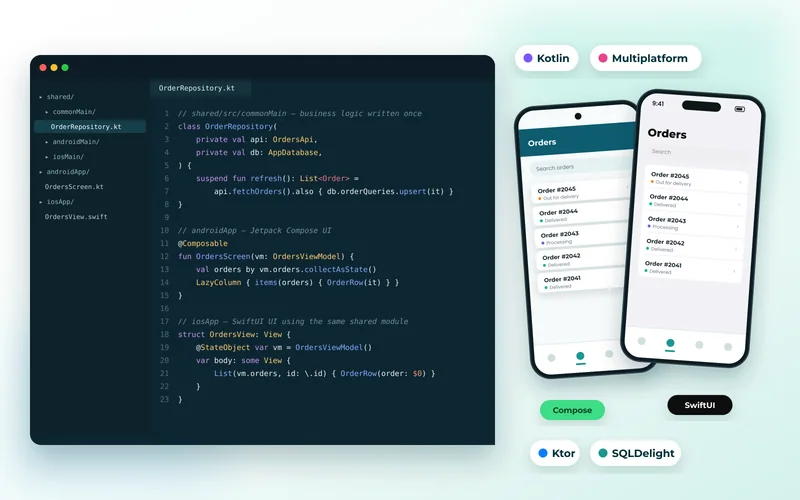
Kotlin Multiplatform: Shared Logic, Genuinely Native Interfaces
Kotlin Multiplatform takes a different approach to cross-platform development. Instead of sharing the user interface, it shares the parts that should never differ between platforms — business rules, networking, data models, validation, caching and offline storage — while Android keeps Jetpack Compose and iOS keeps SwiftUI.
That split suits teams who want native look, feel and performance but are tired of implementing and testing the same logic twice. Pricing rules, sync behaviour and analytics events live in one Kotlin module with one set of unit tests, so the two apps cannot drift apart.
We use Ktor for networking, SQLDelight for typed local databases, kotlinx.serialization for data and coroutines for concurrency, exposing clean interfaces to each platform. Existing native apps can adopt it gradually — one shared module at a time — with no rewrite.
What’s Included
What We Build with Kotlin Multiplatform
Shared Business Logic Modules
Pricing, rules, validation, state and analytics written once in Kotlin and consumed by both apps.
Shared Networking & Data Layer
Ktor API clients, serialization, caching, retry policies and error handling shared across Android and iOS.
Offline Storage with SQLDelight
One typed database schema and sync strategy, compiled natively for each platform.
Native UI on Each Platform
Jetpack Compose on Android and SwiftUI on iOS, so each app follows its own design language exactly.
Compose Multiplatform (Optional)
Where it suits the product, sharing the interface too — including desktop targets — from the same Compose code.
Incremental Adoption
Introducing a shared module into existing native apps without pausing your roadmap or rewriting screens.
Benefits
Why Kotlin Multiplatform?
- Write and test critical logic once — the two apps stay consistent by construction.
- Fully native interfaces, so nothing is compromised in look, feel or performance.
- Adopt it gradually; existing Android and iOS apps do not need rewriting.
- Kotlin developers can cover both platforms for the shared layer.
- Shared code can extend to desktop and web targets as your product grows.
Technologies Used for Kotlin Multiplatform Development
We recommend the right tools for your goals, budget and team — never a one-size-fits-all stack.
Discuss Your ProjectHow We Work
Our Kotlin Multiplatform Development Process
Discovery & Consultation
We learn about your business, audience and goals, review any existing website and agree on clear success criteria.
Strategy & Planning
We define the sitemap, features, technology stack and timeline, so scope and budget are clear before work begins.
UI/UX Design
We design wireframes and polished, responsive layouts for your approval, focused on usability and conversions.
Development
We build with clean, standards-based code, integrate your tools and set up an easy-to-use content editor.
Testing & QA
We test functionality, speed, security, accessibility and SEO across browsers and devices before launch.
Launch & Support
We deploy, monitor and fine-tune your site, then provide ongoing maintenance and support as you grow.
FAQ
Kotlin Multiplatform Development FAQs
How is Kotlin Multiplatform different from Flutter?
Flutter shares the entire app, including the interface, and draws its own widgets. Kotlin Multiplatform shares only the logic layer while each platform keeps its native UI toolkit. KMP suits teams who want native interfaces; Flutter suits teams who want one design everywhere.
Is Kotlin Multiplatform production ready?
Yes. KMP is stable and used in production by large consumer apps. Compose Multiplatform for iOS is newer, so we advise on it per project depending on how custom the interface needs to be.
Can we add KMP to our existing apps?
Yes, and that is the usual path. We extract one area — often networking or a pricing engine — into a shared module, ship it in both apps, then expand from there.
Do iOS developers need to learn Kotlin?
Only lightly. The shared module is exposed to Swift as a normal framework, so iOS engineers call it like any other dependency. Most teams have one or two people maintain the shared layer.
Explore More
More Mobile Apps Services
Technologies and services that work well alongside kotlin multiplatform development.
Mobile App Development
High-performance Android and iPhone apps built with Flutter, Dart, Kotlin and Swift — from idea and UI/UX design to Google Play and App Store launch.
Flutter App Development
Beautiful, fast Flutter apps written in Dart that run natively on Android and iPhone — and on the web — from a single codebase.
React Native App Development
Cross-platform React Native apps in TypeScript — one codebase for Android and iPhone, with native modules, offline support and over-the-air updates.
Android App Development
Native Android apps built in Kotlin with Jetpack Compose — Material 3 design, background work, offline storage and Google Play release management.
Kotlin Multiplatform Development Enquiry
Tell Us About Your Kotlin Multiplatform Project
Tell us which apps exist today and what logic you want to share, so we can plan the shared module and its rollout.
- Reply within 24 hoursA real person reviews every request.
- Free consultationHonest advice, no obligation.
- 100% confidentialHappy to sign an NDA.
- We review your requirements
- We reply with questions or a call slot
- You receive a clear, itemised proposal