Mobile Apps
SwiftUI vs Jetpack Compose: Building Native Interfaces Today
Both platforms have replaced their old UI toolkits with declarative ones that look remarkably alike. That convergence changes how native apps get built.
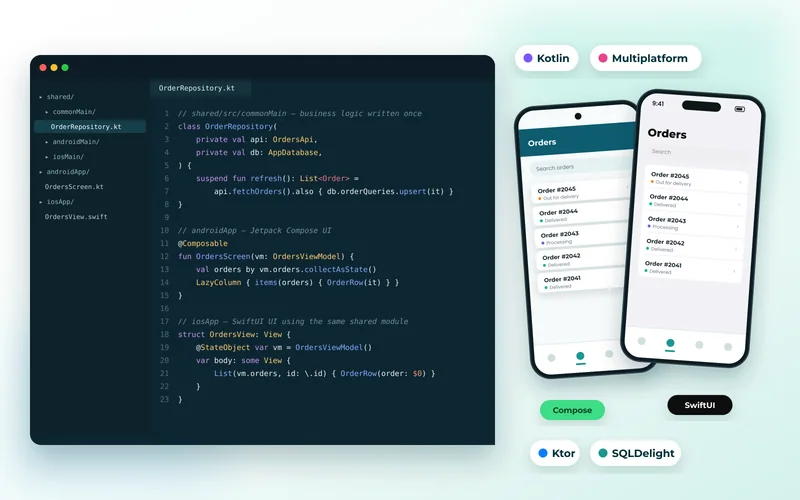
Apple and Google both replaced their long-standing UI toolkits with declarative frameworks — SwiftUI on iOS, Jetpack Compose on Android. You describe what the interface should look like for a given state, and the framework works out how to get there. Anyone who has written React will recognise the idea immediately.
How Similar They Are
Strikingly so. Both use composable functions or views, both manage state with observable values that trigger re-rendering, both favour composition over inheritance, and both provide live previews in the IDE.
The practical effect is that a developer productive in one can read the other. Screen structure, state handling and navigation follow the same shapes even though the languages differ. That convergence is what makes shared-logic approaches viable — the interfaces are written twice but they are no longer two different disciplines.
Where They Differ
- Maturity of layout. Compose's layout system is more predictable; SwiftUI's sizing behaviour still has corners that surprise people, and complex layouts sometimes need fallbacks to UIKit.
- Version support. SwiftUI features are tied to iOS versions, so supporting older devices limits what you can use. Compose ships as a library, so it is less constrained by OS version.
- Escape hatches. Both interoperate with the older toolkits — UIKit and Views — and on real projects you will use that, particularly on iOS.
What This Means for Cross-Platform
Because the two UI models have converged, the "share logic, build UI natively" approach has become far more practical. Kotlin Multiplatform shares networking, models and business rules while Compose and SwiftUI handle each platform's interface — and the two UI layers now look structurally similar enough that maintaining both is less painful than it was.
That is a genuine alternative to sharing everything with Flutter. We compare them in Kotlin Multiplatform vs Flutter and set out the wider field in Flutter vs React Native vs native.
When Native Is Worth the Extra Cost
Building twice costs more. It is justified when the app must feel completely at home on each platform, when you need platform features the moment they ship, when performance is critical, or when the app is your core product rather than a channel.
We built a hotel group's guest iOS app and a warehouse scanning Android app natively for those reasons — one needed to feel premium on iPhone, the other was built around specific hardware.
That work is iOS app development and Android app development respectively, and the choice should be made on requirements rather than preference. Our guide to what a mobile app costs covers the budget implications of building twice.
The Part That Does Not Change
Whichever UI framework you use, the app's responsiveness is largely decided by the server behind it. A beautifully built Compose interface waiting three seconds for a response feels slow, and no amount of animation polish fixes that.
Design the API around the screens, keep payloads small, and make sure the database supports the queries the app makes — the failure modes are the same ones described in why sites slow down as they grow. The broader discipline is mobile app development, not UI framework selection.
Tell us which platforms matter and how native it needs to feel, and we will recommend the approach with the best three-year cost.