Cloud, Data & AI
Database Performance: Why Your Site Slows Down as It Grows
Sites rarely get slower because of traffic. They get slower because queries that were fine with a thousand rows are not fine with a million.
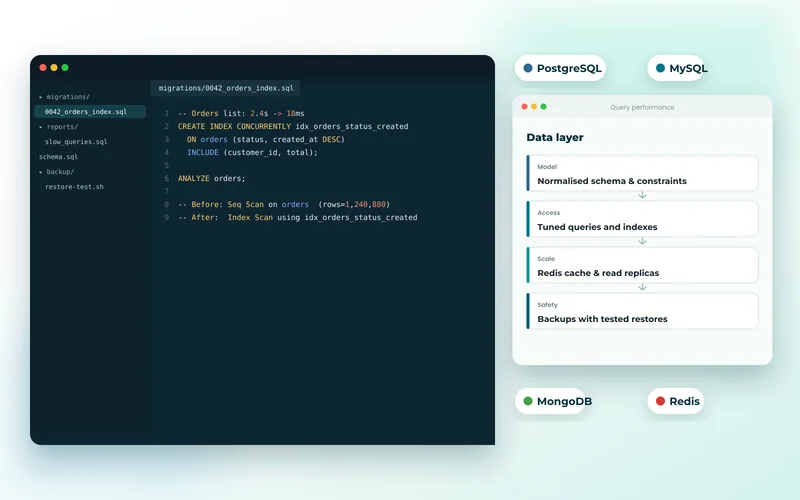
A pattern we see constantly: a site launches fast, performs well for a year, then becomes sluggish. Traffic has not changed much. What has changed is the amount of data, and queries that were instant against a small table are now scanning millions of rows.
The Usual Culprits
Missing Indexes
This is by far the most common cause. Without an index, the database examines every row to find matches. At a thousand rows nobody notices. At a million, the same query takes seconds and holds a connection open while it runs.
The fix is usually small: identify the slow queries, look at what they filter and sort on, and add indexes to match. It is often the single highest-return change available, and it is where we start in database development and optimisation.
The N+1 Query Problem
A page fetches fifty products, then runs one extra query per product to get its category. That is fifty-one queries where two would do. ORMs make this easy to do accidentally because the code looks perfectly reasonable.
It hides well in development, where the data is small and the database is local. In production, with real data and network latency, it dominates page load time.
Queries With No Limit
"Fetch all orders" is harmless in year one and dangerous in year three. Any query that can return an unbounded number of rows will eventually return too many. Pagination is not only a UI concern.
Doing Work on Every Request
Expensive aggregations — totals, counts, reports, dashboards — recalculated on every page view are pure waste when the underlying data changes rarely. Caching results, or maintaining summary tables, removes that work entirely.
How to Find the Real Problem
Do not guess. Enable the slow query log, then look at what actually appears — it is frequently not the query people suspect. Use EXPLAIN to see whether a query uses an index or scans the table; a query reporting a full scan on a large table is your answer.
Measure before and after. "It feels faster" is not a result. We diagnosed a rental marketplace's database performance this way, and the fix turned out to be a handful of indexes and one restructured search query rather than the bigger server that had been proposed.
Scaling Up Is the Expensive Answer
Moving to a larger database server does work, and it is usually the costliest way to buy time. A badly indexed query on a bigger machine is still a badly indexed query — you have simply paid to run it faster. Fix the queries first, then size the infrastructure for what remains. When you genuinely do need more capacity, that is a cloud and DevOps exercise, including read replicas and connection pooling.
Where Caching Belongs
Caching is powerful and frequently misapplied as a way to hide slow queries. Used well it removes repeated work: an in-memory cache such as Redis for hot data, HTTP caching for pages that rarely change, a CDN for static assets. Used badly it adds stale data and a new class of bug. Cache deliberately, with clear invalidation rules.
It Is Rarely Only the Database
Slow pages usually have several contributing causes: unoptimised images, render-blocking scripts, third-party tags and slow queries together. A proper website speed optimisation engagement measures all of them rather than assuming. Our guide to improving Core Web Vitals covers the front-end half in detail.
If the application code itself is the bottleneck, that is a different fix again — see troubleshooting and bug fixes.
If your site has got slower as it has grown, tell us what changed and when. A short diagnostic usually identifies the cause quickly, and the fix is often far smaller than people expect.