A native Kotlin app for rugged scanners that keeps working when the warehouse Wi-Fi does not.
View live demo Opens a working demo with sample content in a new tab.
On location
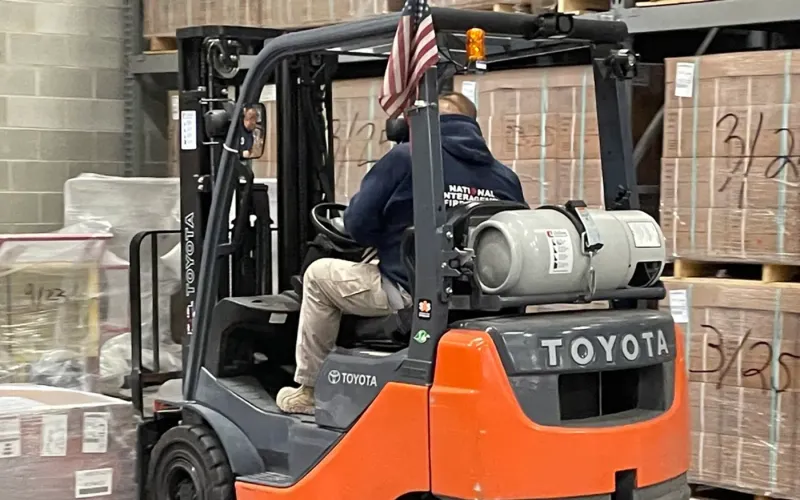
Returns Warehouse Forklift moving boxesCC0 photo
Forklift operator shuttles pallet loadedCC0 photo
Capitol Area Food Bank CAFBPhoto: U.S. Department of Agriculture (CC0)
Professional Packaging Systems' Quality PackagingPhoto: U.S. Department of Agriculture (CC0)
Warehouse aisle with stocked pallet rackingCC0 photo
About the Project
This project is a warehouse scanning app for a third-party logistics provider whose pickers kept losing time to Wi-Fi dead zones. Every time a handheld dropped its connection in a far aisle or a cold store, the picker had to stop, walk back into signal and wait for the next instruction, while paper pick sheets filled the gaps.
We built a native Kotlin app for rugged Android scanners that keeps working whether or not the network does. The whole pick wave downloads to the device, the hardware scan trigger confirms every item at the shelf, and scans upload in the background as soon as signal returns. Average time per pick line is now around eleven seconds, and mis-picks are caught at the shelf rather than at dispatch.
About the Client
The client is a third-party logistics provider running warehouse operations on behalf of its customers. Accuracy and speed are what those customers buy, so every mis-pick and every minute lost walking back into Wi-Fi has a direct cost to the business and its reputation.
The operation already used rugged Android scanners with built-in barcode hardware, but the existing software assumed a constant connection and treated the scanner like an ordinary phone.
Project Goals
Keep pickers working through Wi-Fi dead zones without interruption.
Use the scanner’s hardware trigger for fast, reliable barcode capture.
Catch mis-picks at the shelf instead of at dispatch.
Design screens that work with gloves, under poor light and at speed.
Remove paper pick sheets from the operation.
Project Overview
The Challenge and Our Solution
The Challenge
Pickers worked from printed sheets and keyed results into a terminal at the end of each wave, so errors surfaced hours later at dispatch. A previous browser-based attempt failed because the warehouse had dead zones where Wi-Fi dropped entirely, and the rugged scanners in use had hardware trigger keys that the web app could not read.
Our Solution
We built a native Android app in Kotlin with Jetpack Compose, designed for gloved hands and a hardware scan trigger. The full wave is downloaded to a Room database before the picker starts, so dead zones are irrelevant, and WorkManager uploads scans whenever connectivity returns. Screens are deliberately sparse — location, item, quantity, confirm — and mis-picks are caught at the moment of scanning rather than at dispatch.
An Offline-First Android App for the Whole Wave
Rather than fetching one instruction at a time, the app downloads the entire pick wave and stores it locally in a Room database. Locations, items, quantities and sequence are all on the device, so a picker in a dead zone simply carries on to the next line. Connectivity never decides whether work can continue.
Every scan is recorded locally first and queued for upload, which means nothing is lost if a device drops off the network mid-aisle.
Whole pick wave stored on the device
Scans recorded locally and queued
No dependency on live Wi-Fi to keep picking
Rugged Device Barcode Scanning With the Hardware Trigger
Speed on the warehouse floor comes from the hardware. The app integrates natively with the rugged devices’ trigger keys and barcode engines through the manufacturer’s scanning SDK, so a squeeze of the trigger reads the code instantly without opening a camera view or tapping the screen.
Each scan is checked against the expected item and quantity on the spot. A wrong item raises a clear warning before it ever leaves the shelf, which is why mis-picks are now caught where they happen rather than discovered at the packing bench or by the customer.
Glove-Friendly Screens Built With Jetpack Compose
Warehouse software is used one-handed, with gloves, while walking. We designed single-decision screens with large targets and high contrast, built in Jetpack Compose, so a picker always knows the next location, the item and the quantity at a glance. There is nothing to read twice and nothing small to tap.
Average time per pick line came down to about eleven seconds, helped as much by these screens as by the scanning hardware.
We tested every screen on the warehouse floor rather than at a desk: under the lighting in the far aisles, at walking pace, and with the gloves pickers actually wear. Anything that needed a second glance or a careful tap was simplified until it did not.
Background Sync With WorkManager
When a device returns to signal, WorkManager uploads queued scans to the REST API and pulls any new waves without the picker doing anything. Sync is reliable across restarts and low battery, and supervisors see progress as soon as the data lands.
With waves on the device and sync in the background, the paper pick sheets that once filled the gaps have been removed from the operation entirely. Hilt keeps the codebase modular and testable as the operation adds features.
Our Process
How We Delivered It
1
Time on the Warehouse Floor
We walked waves with pickers, mapped the dead zones and timed where seconds were being lost.
2
Offline Data Model
Waves, lines and scans modelled in Room so the device can work for a full wave without a connection.
3
Hardware Integration
Trigger keys and barcode engines integrated through the device manufacturer’s scanning SDK.
4
Glove-Friendly Interface
Single-decision screens in Jetpack Compose, tested on the floor with real gloves and real lighting.
5
Sync, Pilot and Roll-Out
WorkManager sync proven on a pilot shift before every picker moved to the app.
Key Features
What We Delivered
Offline wave download
The entire pick wave stored locally in Room, so connectivity never blocks a picker.
Hardware scan trigger
Native integration with rugged device trigger keys and barcode hardware.
Glove-friendly interface
Large targets, high contrast and single-decision screens designed for warehouse use.
Background sync
WorkManager uploads scans and pulls new waves as soon as signal returns.
Outcome
Results and Impact
Average time per pick line down to about 11 seconds.
Mis-picks caught at the shelf instead of at dispatch.
Warehouse dead zones no longer interrupt work — everything runs offline.
Paper pick sheets removed from the operation.
Client Feedback
What the Client Says
★★★★★
Our pickers work in parts of the warehouse where Wi-Fi does not reach. The app never notices. Eleven seconds a line, mis-picks caught at the shelf rather than at dispatch, and no more paper.
Operations ManagerThird-party logistics provider
Services
Services Behind This Project
The Android App expertise we used to build this android app development — and can bring to yours.
Native Android apps built in Kotlin with Jetpack Compose — Material 3 design, background work, offline storage and Google Play release management.
Learn more
FAQ
Frequently Asked Questions
Why build a native Kotlin app instead of a web app for scanners?
Rugged scanners expose their trigger keys and barcode engines through native SDKs, and an offline-first app needs a reliable local database and background work. Native Kotlin gives direct access to all three, which is what makes scanning instant and offline working dependable.
What happens to scans made without a connection?
They are saved on the device straight away and queued. As soon as the scanner is back in signal, WorkManager uploads them in the background and fetches new work. Nothing depends on the picker remembering to sync.
Will the app work with our existing rugged devices?
Most likely. Major rugged device manufacturers provide scanning SDKs for Android, and the app is built to use them. During discovery we confirm your models and Android versions and test on your actual hardware before roll-out.
How does the app reduce mis-picks?
Each scan is checked against the expected item and quantity at the shelf. If the wrong item is scanned, the picker sees a clear warning immediately and can correct it before moving on, so errors are fixed where they happen instead of at dispatch.
Can it connect to our warehouse management system?
Yes. The app talks to a REST API, which can sit in front of your WMS or be part of it. We agree the data each wave needs and how completed picks are posted back, then build and test that integration alongside the app.
What drives the cost of a warehouse scanning app?
The number of workflows (picking, packing, returns, counts), the depth of WMS integration and the range of devices to support. Starting with the workflow that loses the most time, often picking, gives the quickest return before adding the rest.
Similar Work
Related Projects
Case studies built with the same technologies or for similar needs.