Cloud, Data & AI
Cloud Migration Checklist: Moving to AWS, Azure or Google Cloud Without Downtime
The migrations that go wrong skip the same steps every time. Here is the checklist we use to move websites, applications and databases to the cloud with a rehearsed cutover and a predictable bill.
Cloud migrations fail in boring ways. A cron job on the old server that nobody documented. A hard-coded IP address in a config file. A database copy that took nine hours when the plan allowed four. A bill that arrived three times the size of the estimate. None of these are technical mysteries; they are skipped steps. This is the checklist that avoids them, drawn from our cloud migration work.
1. Inventory Everything, Including the Boring Parts
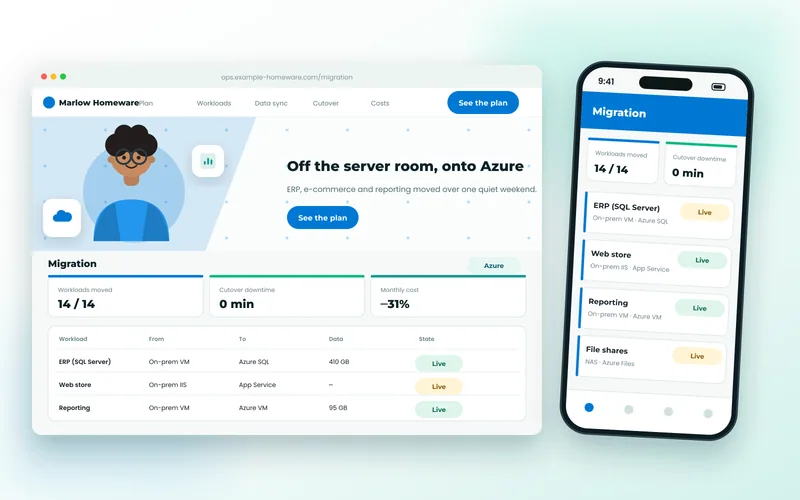
List every application, database, scheduled job, file share, integration and DNS record. Then find the ones nobody listed: log into each server and look at cron, services, and what is actually listening on the network. When we moved a homeware retailer from its server room to Azure, the inventory found fourteen workloads where the IT contact had counted eight, including a report scheduler the finance team relied on every Monday.
2. Map Dependencies
Which application talks to which database? What calls the ERP's API? Where are server names and IP addresses hard-coded? Dependencies determine the order things move in and what breaks if one moves without the other.
3. Choose the Cloud for Reasons
AWS, Azure and Google Cloud all run ordinary web workloads well. Choose on existing credits, where your other systems already live, your team's familiarity, and specific services you need — Azure for Microsoft-centric estates, Google Cloud for data and Kubernetes tooling, AWS for breadth. Fashion is not a reason.
4. Design the Target, Then Price It
Lift-and-shift onto virtual machines is fastest but usually the most expensive way to run in the cloud. Managed databases, app platforms and object storage are cheaper and more reliable for most workloads, and worth the re-platforming for the pieces that fit. Produce a cost forecast before anyone commits — and if the cloud comes out more expensive than a good VPS for a small site, say so. Our cloud and DevOps team does exactly that comparison.
5. Move the Data Carefully
Databases decide the cutover window. Set up continuous replication or a dump-and-incremental-sync so the final switch copies minutes of changes, not days. Test restores. Know your database's quirks before you move it; our database services handle MySQL, PostgreSQL, SQL Server and MongoDB moves regularly.
6. Build in Parallel and Rehearse
The new environment should be fully running, with real data, while the old one still serves customers. Then rehearse the cutover on a copy — the whole thing, timed, at least once. The rehearsal is where you discover the nine-hour copy and the hard-coded IP, on a Tuesday afternoon rather than the live weekend.
7. Cut Over With a Rollback
Lower DNS TTLs a day ahead. Write the rollback plan and the go/no-go checks. Do the final data sync, switch DNS, verify each workload, and keep the old environment untouched for a week. A rehearsed cutover is a routine step; an unrehearsed one is a leap.
8. Set Up Security and Cost Control on Day One
IAM roles rather than shared logins, private networking for databases, encrypted storage, secrets management and firewall rules belong in the migration, not on a to-do list afterwards. So do budget alerts, right-sized instances and reserved capacity for steady workloads. Review the first month's bill against the forecast and adjust.
What Gets Migrated Alongside
Containerising applications as part of the move — with Docker, and Kubernetes only where warranted — makes the cloud environment reproducible and future moves far easier. And if the migration involves a website changing platform as well as host, the SEO side is covered in our guide to website migration and replatforming.
If a hardware refresh, a lease ending or an unreliable server is pushing you towards the cloud, tell us what you run. The inventory and forecast come first, and you will know the cost and the plan before deciding.