Web Development
Publishing Financial Insights Under Compliance: Approval Workflows, Disclaimers and Archives
Financial firms publish guides and market notes that must be reviewed, carry the right warnings and be provable years later. Here is how we build approval, disclaimers, archiving and gated content into the publishing system itself, without making the site slow or the writers miserable.
For a financial advisory firm, the website is often its library: pension guides, tax-year explainers and short market notes written the morning after a rate decision. All of it is published under the firm's name, so all of it has to be reviewed, and that review has to be provable later, not just agreed in a meeting.
Most firms we meet handle this with a spreadsheet beside the CMS. It works until someone asks, two years on, who approved a particular version of a particular article. This post covers how we build compliance into the publishing system instead, usually with our headless CMS development approach. We are developers, not compliance advisers: your compliance officer decides what the rules are, and the site's job is to enforce and record them.
Why the Spreadsheet Fails
A spreadsheet records an intention: "reviewed by J, 12 March". It does not stop an unreviewed article going live, it does not know when an approved article was edited afterwards, and it lives outside the system that actually published the page. When the record and the published content can drift apart, the record proves very little.
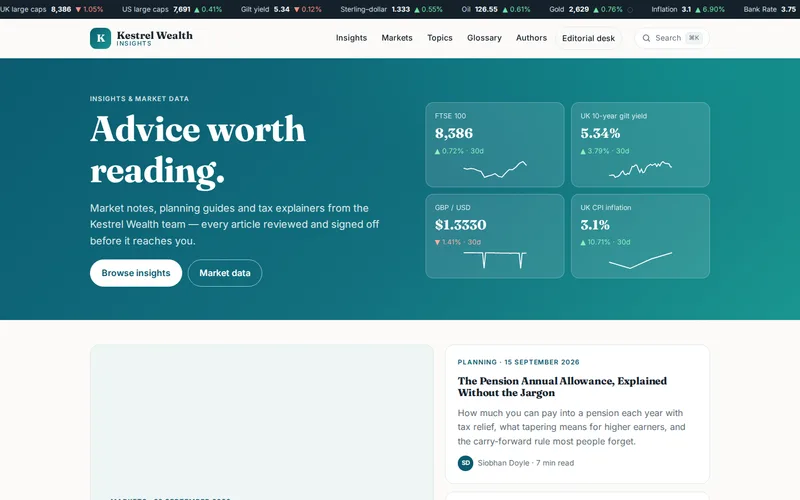
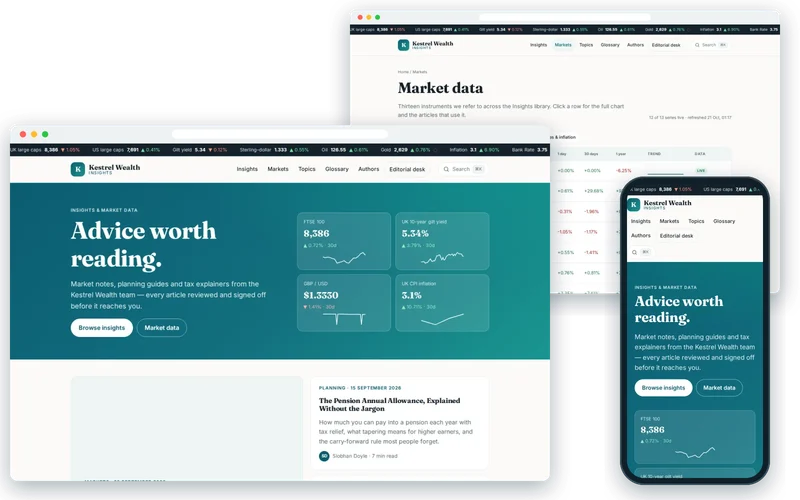
That was the position of the independent advisory firm behind the wealth management insights hub we rebuilt. Around four hundred articles and market notes sat on a plugin-heavy WordPress site, and compliance review was tracked in a separate spreadsheet.
Build Approval Into the Publishing Flow
On that project we added custom statuses inside WordPress: draft, in review, approved and published. Each status change stores the reviewer, the time and any notes against the article, and an article cannot reach the public site until an approval is recorded. The writers and compliance officer kept the editing screens they already knew; the difference is that the workflow is now enforced rather than remembered.
When we design a workflow like this, these are the decisions we settle with the compliance officer first:
- Who can approve. Usually a named role, and an author should not be able to approve their own article.
- What happens after approval. We recommend that any edit to an approved article's text sends it back to review, while purely technical changes, such as fixing an image, can be configured not to.
- Scheduled publishing. An article can be scheduled for a future time only once it is approved, so a market note cannot go out at 7am unreviewed.
- Urgent content. Market notes need a fast path, such as a mobile-friendly review screen, not a skipped step.
- Periodic re-review. Evergreen guides about allowances and tax rules need a review date, with a reminder when it passes.
Disclaimers and Risk Warnings as Managed Components
On many financial sites, disclaimers are pasted into the bottom of each article by hand. Over years they drift: some articles carry last year's wording, some carry none, and changing the wording means editing hundreds of pages.
A better pattern is to treat warnings as components that compliance owns:
- A small library of approved warnings, such as investment risk, tax treatment depending on circumstances, or the content not being personal advice, each maintained in one place.
- Rules that attach the right warnings by content type or topic, so an investment article cannot be published without the investment warning.
- A version number on each warning, recorded against the article when it is approved, so you can show which wording was live at the time.
- Clear dating: market notes show the date and time they were written prominently, and guides show when they were last reviewed.
Archiving: Being Able to Show What Was Live, and When
A regulated firm may be asked what a page said on a particular date. WordPress revisions help but are not designed as a compliance archive: they can be pruned, and they do not capture the warnings, author details and surrounding page as the reader saw them.
What we put in place depends on the firm's retention requirements, which is a question for its compliance function, but typically includes an immutable snapshot of each approved version with its approval record and warning versions, retained for the agreed period. For withdrawn articles we prefer a clear archive notice over silent deletion when the content may still be linked, with a redirect where the article is replaced by a newer one. Either way, the decision and the date are recorded.
Gated Content: Decide What the Gate Is For
Many firms put an annual outlook or a planning guide behind an email form. That can work, but it is worth being clear about the purpose. A gate collects contact details and costs you search visibility and readers. Content that earns its place by being found, such as evergreen guides, is usually better left open. Content that is genuinely premium, or that marks the start of an advice conversation, is a fair candidate for a gate.
If you gate, ask only for what you will use, explain how the details will be used and link the privacy notice. A client-only area with portfolio documents is a different thing altogether: it needs proper authentication, access logging and a security review, and should be planned as an application, not a form.
Speed and Search Still Matter
Compliance requirements tend to accumulate plugins, and plugins tend to slow sites down. On the insights hub, the old site took around four seconds to render an article on a phone. We kept WordPress for writing and review and put a Next.js front end in front of it, rendering pages ahead of time and serving them from a CDN. Publishing triggers on-demand revalidation, so an approved market note is live within seconds rather than waiting for a full rebuild.
Structured data, canonical URLs and article metadata are generated from CMS fields rather than a plugin, and topic and author archives bring older guides back into view. Mobile largest contentful paint fell from about four seconds to under one, and organic sessions rose by 180% over eight months on the same publishing cadence. Clear author pages also matter in finance, where readers and search engines both look for evidence of who is giving the information.
If you are weighing up whether to separate editing from the public site, our comparison of headless and traditional CMS sets out the trade-offs, and why Next.js became the default for React websites explains the front-end side.
Questions to Ask Before You Commission a Content Hub
- Can an article reach the public site without a recorded approval? Prove it.
- What happens to the approval when an approved article is edited?
- Where is the approved version stored, and for how long?
- Who maintains the disclaimer wording, and how is it attached to articles?
- How quickly can an approved market note go live?
- Will our writers need to learn a new editing tool?
We often keep WordPress as the editing environment because it is where the team already works. If your firm is tracking approvals outside the CMS today, tell us how your review process works and we will sketch how it would run inside your publishing system.
Frequently Asked Questions
Can WordPress handle a compliance approval workflow?
Yes. WordPress supports custom post statuses and role-based permissions, which can be used to build draft, review, approved and published states, with the reviewer, time and notes stored against each article. The key is that the public site only shows content in an approved or published state, so an unreviewed article cannot appear even if someone presses the wrong button. Off-the-shelf editorial plugins can cover simple cases, but a regulated workflow is usually worth building to your exact rules.
Do we need a headless setup to meet compliance requirements?
No. Approval workflows, managed disclaimers and archiving can all be built into a traditional WordPress site. A headless front end is about speed, security and flexibility on the reader side: the public site is pre-rendered and served from a CDN, and the editing system is no longer directly exposed. Many firms choose it because compliance plugins had made their existing site slow, not because compliance requires it.
How should market notes be handled differently from evergreen guides?
Market notes are time-sensitive and become outdated quickly, so they need a fast review path and a prominent date and time. Evergreen guides stay live for years and need periodic re-review, especially when allowances or tax rules change, so each one should carry a review date and trigger a reminder when it passes. Some firms also add a notice to old market notes stating that the views were current at the time of writing.
Is it better to gate our reports behind an email form?
It depends on what the report is for. Gating collects contact details but reduces readership and stops search engines from sending visitors to that content. Guides that answer common questions usually perform better left open, where they build trust and traffic. Gate content that is genuinely premium or that naturally leads to an advice conversation, ask for as little information as possible, and make clear how it will be used.