Cloud, Data & AI
CI/CD for Small Teams: A Deployment Pipeline You Can Trust
When deployments depend on one person running commands from memory, releases become rare and risky. Here is the simple CI/CD pipeline we set up for small teams: what it checks, how it deploys, how it rolls back and how to introduce it in stages.
In many small teams, deploying still means one person logging in to the server, pulling the latest code, running a few commands from memory and refreshing the site to see whether it still works. It works until that person is on holiday, or a step gets missed, or a release goes out on a Friday afternoon and nobody can say exactly what changed. Releases become rare and nervous, which makes each one bigger and riskier still.
A continuous integration and delivery (CI/CD) pipeline replaces that ritual with a repeatable, visible process. Setting these up is a regular part of our cloud hosting and DevOps work, and for a small team the goal is not an elaborate platform. It is a pipeline that is simple enough to understand and dependable enough to trust.
What the Pipeline Needs to Do
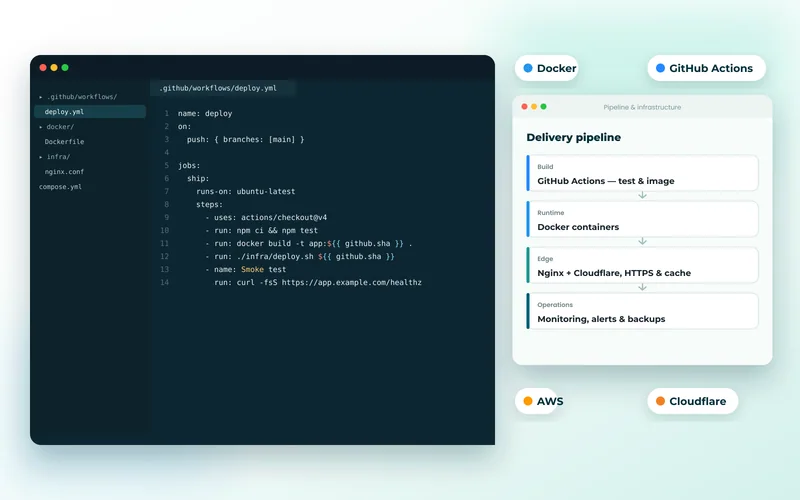
For most web applications, the whole thing fits on one page:
- On every push or pull request: install dependencies, run linters and static checks, run the tests, and build the application.
- On merge to the main branch: build the release artefact once, deploy it to staging and run a short smoke test.
- Promote to production: either automatically when staging passes, or with a one-click approval while the team builds confidence.
- Check and report: confirm the live site is healthy, and post the result where the team will see it.
Everything else is optional. Resist adding stages until a real problem calls for them.
Build Once, Deploy the Same Thing Everywhere
The most common weakness we find is building separately on each server. If staging and production each run their own install, they can end up with different dependency versions, and a release that passed on staging can still fail in production.
Instead, build one artefact per commit and promote that exact artefact. For containerised applications it is a Docker image tagged with the commit hash, pushed to a registry; our Docker and Kubernetes work covers how those images are built. For traditional server deployments it can be an archive containing the code and installed dependencies. Configuration that differs between environments, such as database addresses and API keys, comes from environment variables or a secrets store, never from a different build.
Checks Worth Running on Every Change
A pipeline that takes too long gets bypassed, so order the checks from fastest to slowest and fail early:
- Formatting and linting: ESLint, Prettier, PHP CS Fixer or Ruff, depending on the stack.
- Static analysis and type checks: TypeScript's compiler, PHPStan or Larastan, mypy. These catch whole classes of bugs before a test runs.
- Unit tests, then a smaller set of integration tests against a real database started as a service container in the pipeline, so they match production behaviour.
- Dependency audits: npm audit, composer audit or pip-audit to flag known vulnerable packages.
Cache dependencies between runs and aim for feedback within minutes. Flaky tests deserve urgent attention: once a team learns to re-run a red build until it turns green, the pipeline has stopped protecting anyone.
Deploying Without Drama
The deployment step itself should be boring. On a traditional server, the reliable pattern is atomic releases: upload the new version to a fresh release directory, run any preparation, then switch a symlink so the live site moves to the new version in one step. Tools such as Deployer handle this for PHP applications, and the previous few releases stay on disk so a rollback is just another symlink switch.
For containers, a rolling update replaces old instances only once new ones pass their health checks. Either way:
- Make database migrations backward compatible, so the old code keeps working while the new code rolls out. Add columns first, remove old ones in a later release.
- Run a health check and a smoke test against the live site after every deployment.
- Roll back automatically, or with one command, if those checks fail.
For applications on Kubernetes, our article on zero-downtime deployments on Kubernetes covers probes, migrations and rollbacks in depth.
Secrets, Permissions and Branch Rules
A pipeline that can deploy to production is a powerful thing, so protect it:
- Store credentials in the CI system's secrets, scoped to the environment that needs them. GitHub Actions environments and GitLab protected variables both support this.
- Prefer short-lived credentials. GitHub Actions and GitLab CI can sign in to AWS, Azure and Google Cloud using OpenID Connect, so there are no long-lived cloud keys to leak.
- Protect the main branch: require pull requests, a review and passing checks before merging.
- Give the deploy user only the access it needs, and no interactive shell if it can be avoided.
Choosing the Tooling
Use the CI system that lives next to your code. If the repository is on GitHub, GitHub Actions is the obvious choice; on GitLab, GitLab CI; on Bitbucket, Bitbucket Pipelines. All three keep the pipeline definition in a file inside the repository, so changes to the process are reviewed like code. Self-hosted runners are worth considering when builds are heavy or deployments need to reach servers on a private network.
A single application does not need a dedicated deployment platform, a GitOps controller or a release management product. Like Kubernetes itself, which our guide on whether you actually need Kubernetes weighs up, those earn their place with many services and many teams. For a small team, the best pipeline is the one every developer can read and fix.
Introducing It in Stages
You do not need to switch everything over at once. A sequence that works well:
- Run checks on pull requests only. No deployment changes yet.
- Automate deployment to staging on merge.
- Automate production deployment behind a manual approval.
- Remove routine manual server access once the team trusts the pipeline.
Each step pays off on its own. Combined with sound server and hosting management and monitoring, it turns releases into a routine. When something does go wrong after a release, having every change tied to a commit makes our troubleshooting work much faster, too.
If your deployments still depend on one person and a list of commands, tell us where your code is hosted and where it runs. We will design a pipeline your team can understand and own.
Frequently Asked Questions
Is CI/CD worth it for a team of two or three developers?
Yes, arguably more than for large teams, because small teams cannot afford a lost day to a broken release or dependence on one person who knows the deployment steps. A basic pipeline with tests, a staging deploy and a one-click production release can be set up quickly and then needs little maintenance.
Do we need automated tests before setting up a pipeline?
It helps, but it is not a precondition. A pipeline that only lints, runs static analysis, builds the application and deploys it consistently is already safer than manual deployment. Tests can be added over time, starting with the parts of the application where a bug would cost the most, such as checkout, sign-in or billing.
Can a CI/CD pipeline deploy to shared hosting or a single VPS?
A single VPS works very well, typically using SSH and atomic release directories so the switch to a new version is instant. Shared hosting is more limited because SSH access and command-line tools may be restricted, but deployment over SFTP from the pipeline is often still possible and better than uploading files by hand.
Should every merge go straight to production automatically?
Not at first. Most teams start with an automatic staging deploy and a manual approval step for production. Once tests and post-deploy health checks have proved reliable, removing the approval for routine changes is a sensible next step, and smaller, more frequent releases are generally safer than large ones.
What happens if a deployment fails halfway through?
With atomic releases or rolling container updates, a failed deployment never replaces the running version, so visitors keep using the previous release. If the failure appears only after the switch, the pipeline or a single command points the site back at the previous release. Database migrations are the part that needs care, which is why they should be backward compatible.