Cloud, Data & AI
Proof-of-Delivery Capture With Phone Cameras: From Tail-Lift Photo to Invoice
Drivers already photograph signed delivery notes. Turning those photos into invoice-ready data depends on four things: image quality, a capture flow that survives poor signal, extraction that knows which fields it is unsure about, and a sensible way to handle exceptions.
Every delivery ends the same way: a customer signs a paper note on the tail-lift, often in the rain, and the driver takes a photo of it. What happens next decides how quickly the business gets paid. In many haulage and distribution firms, the photo travels to an office where someone types the customer, the quantities and any damage notes into the transport system before an invoice can go out.
Automating that step is a common request for our OCR and document processing service. We have written about what accuracy to expect from OCR in general; this post is about the specific problem of proof-of-delivery photos taken on phones, drawing on our delivery note OCR project for a regional haulage firm.
Start With What Drivers Already Do
The tempting design is a new process: a new form, a barcode on every note, a driver app with fields to fill in. It rarely survives contact with real deliveries. Customers sign whatever note the driver hands them, many have their own receiving procedures, and nobody wants extra steps at the tail-lift.
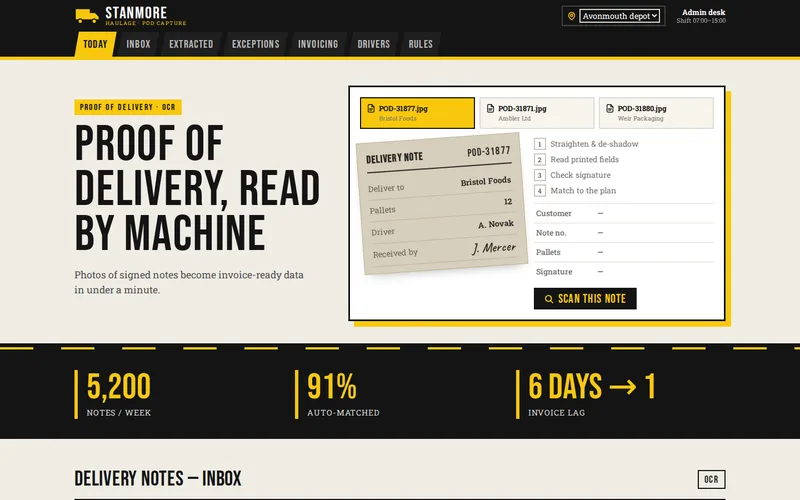
On the haulage project we deliberately changed nothing for drivers. They keep photographing the signed note exactly as before, and the intelligence sits on the server. The firm handles around 5,200 notes a week, and any approach that added even a minute per delivery would have cost more than it saved. If you do build a dedicated capture app, the same principle applies: one photo, one tap, and everything else automatic.
Image Quality Decides Accuracy
The most important lesson from the haulage project came early: the quality of the photograph mattered more than the choice of model. Drivers photograph notes at an angle, in shadow under a trailer, or in poor light at the end of a shift. Before anything is read, an OpenCV stage corrects skew, flattens shadows and balances exposure so the document model sees something close to a scanned page. That clean-up lifted accuracy more than any model change we tried.
Where you control the capture screen, you can improve photos at the source too. Features we recommend in a capture app:
- Edge detection with a live outline, so the driver can see the whole note is in frame before taking the picture.
- Blur and glare checks straight after capture, with a prompt to retake while the driver is still at the vehicle, not three days later.
- Full-resolution originals kept, with compression applied only to previews. Heavy compression destroys faint handwriting.
- Multi-page capture for notes with continuation sheets, kept together as one delivery.
Offline Queues: When the Yard Has No Signal
Loading bays, rural farms and the inside of large warehouses are often dead zones. A capture flow that needs signal at the moment of the photo will lose notes, or train drivers to send them later from a personal phone. A robust capture app treats the upload as a queue:
- Save locally first. The photo and its metadata (job reference, time, driver and, with consent, location) are stored on the device the instant the photo is taken.
- Upload in the background when signal returns, retrying with increasing gaps rather than draining the battery.
- Give every capture a unique ID created on the phone, so an upload that is retried after a timeout cannot create two proof-of-delivery records.
- Delete only after the server confirms receipt, and show the driver what is still waiting to send.
These are the same patterns we use in other field software; offline-first PWAs for field teams explains them in more depth, and our utility inspection field app is an example built for crews with no usable signal.
Extracting the Fields That Matter
A delivery note mixes two very different kinds of content. Printed fields such as the customer, the note number and the planned load are predictable. Handwritten pallet counts, damage remarks and signatures are not. On the haulage project, printed fields are read by a document model in Azure Document Intelligence, while handwriting and signatures are verified in a separate stage that produces its own confidence score for each value.
Keeping the stages apart has a practical benefit: a faint signature does not drag down confidence in a perfectly legible customer name, and the system can say exactly which field it is unsure about. That precision is what keeps human review quick. If you need extraction tied into other systems or language models, our AI integration and Python development services cover the pipeline work behind it.
Match Against the Plan, Then Handle Exceptions
Reading a note is only half the job. The other half is asking whether it agrees with what was supposed to happen. Each extracted note on the haulage project is reconciled against the planned delivery in the transport system, read through its API: the expected customer, date and pallet count. When everything agrees, the delivery is released for invoicing with no human input. That now happens for 91% of notes.
The rest are exceptions, and they are where the value is. Typical ones are:
- Quantity mismatch: eighteen pallets read where twenty were planned.
- Uncertain signature or handwriting: a value below the confidence threshold.
- No match: a note that does not correspond to any planned delivery.
- Missing proof: a completed job with no photo after a set time, which a capture app can flag to the driver or depot.
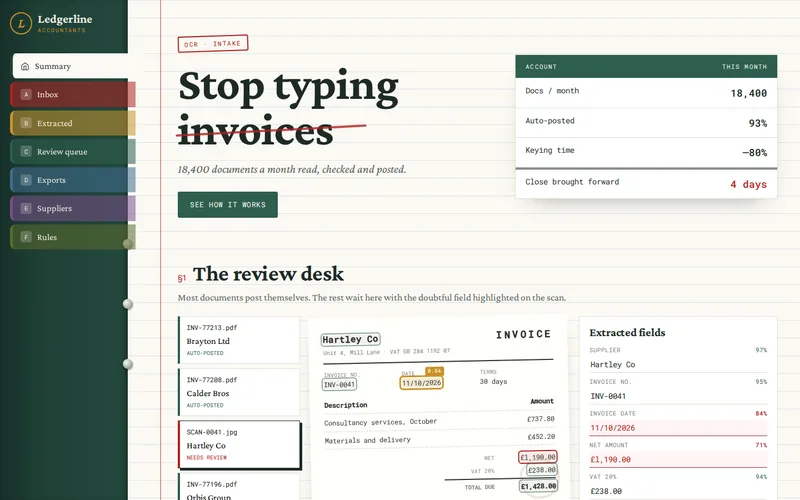
Exceptions land in a review queue showing the photograph and the extracted fields side by side, with uncertain values highlighted. One click corrects a value and releases the invoice. Discrepancies get resolved while the delivery is fresh in everyone's memory, rather than surfacing weeks later as a disputed invoice. Administrators who used to type all day now handle exceptions and disputes instead, and the gap between delivery and invoice fell from six days to one.
What to Measure
- Straight-through rate: the share of notes invoiced with no human input.
- Delivery-to-invoice time: the number that finance actually cares about.
- Exception reasons: if one customer's notes cause most exceptions, the fix may be a conversation, not a model.
- Time per exception: a review screen that takes more than a few seconds per note needs redesigning.
Before You Start
Collect a large sample of real photos, including the bad ones, before choosing any technology; the haulage project began with exactly that paperwork audit. Check whether your transport system has an API for planned deliveries, decide how long images must be retained, and switch automatic invoicing on in stages while exceptions are watched closely.
If your office is still typing delivery notes, send us twenty real photos, good and bad, along with the name of your transport system. We will tell you what an automated pipeline could read from them and where the exceptions would come from.
Frequently Asked Questions
Do we need a dedicated driver app to automate proof of delivery?
Not necessarily. On our haulage project drivers kept sending photos the way they already did, and all the processing happened on the server. A dedicated capture app becomes worthwhile when you want to improve photo quality at the source, link each photo to a job reference automatically, or support areas with poor signal through an offline upload queue. It can be added later without changing the processing pipeline.
Can OCR read handwritten pallet counts and damage notes reliably?
Handwritten numbers in a predictable place, such as a pallet count box, can be read well once the image is cleaned up, especially when the result is checked against the planned quantity. Free-text damage remarks are harder, so a practical design flags that a remark exists and shows it to a person rather than trying to interpret every word. Confidence scores decide which values go straight through and which are reviewed.
What happens to the photos after the data has been extracted?
They are kept alongside the extracted data, so any delivery can be checked against its original note during a dispute. On our haulage project every note is searchable by customer, date and driver within seconds. How long to keep images is a business and legal decision, usually tied to how long invoices can be disputed and to your customers' contract terms, and storage can move older images to cheaper tiers automatically.
How long does it take to set up proof-of-delivery OCR?
The timeline depends mostly on the variety of note layouts, the quality of incoming photos and the transport system integration. We start with a paperwork audit of real samples, build and measure the image clean-up and extraction stages, then shape the review queue with the people who will use it. Automatic invoicing is switched on in stages, so the business benefits before every edge case has been handled.
Can this work with customer delivery notes in many different formats?
Yes, with some planning. Document models handle varied layouts better than older template-based OCR, and matching against the planned delivery helps because the system knows roughly what it expects to find. The audit stage identifies the most common layouts and the awkward ones, and low-volume formats that read poorly can be routed to review rather than holding up the rest.