App Development
Tenant Portal Features That Actually Reduce Calls to the Office
Most calls to a property management office are tenants checking on something they could have seen for themselves. These are the portal features that answer those questions first: guided repair reports with photos, live job status, contractor access, rent payments, documents and notices.
Most calls to a lettings or property management office are not really requests. They are people checking. Has anyone seen my repair? When is the plumber coming? Did my rent go through? Where is my tenancy agreement? Each call takes a few minutes, interrupts something else, and usually ends with a member of staff looking up information the tenant could have seen for themselves.
A tenant portal earns its cost by answering those questions before they are asked. We built one for a residential property management company looking after 1,140 units, and the features below are the ones that made the difference. The platform was built in Laravel, which suits this kind of system: several kinds of user, a lot of records, and plenty of background work such as reminders and statements.
Repair Reporting That Gets It Right First Time
The first call a portal removes is the repair report itself, but only if the online form is better than a phone call. A blank text box produces "kitchen broken, please fix", which leads to a call back to find out what is broken. A guided form asks what a good member of staff would:
- Where in the home: kitchen, bathroom, bedroom, outside, communal areas.
- What kind of problem: leak, heating, electrics, appliance, door or window.
- How urgent it feels, with plain guidance on what counts as an emergency and the number to ring for those.
- A photo or two, taken straight from the phone.
- Access details: times that suit, pets, whether a contractor may use a key.
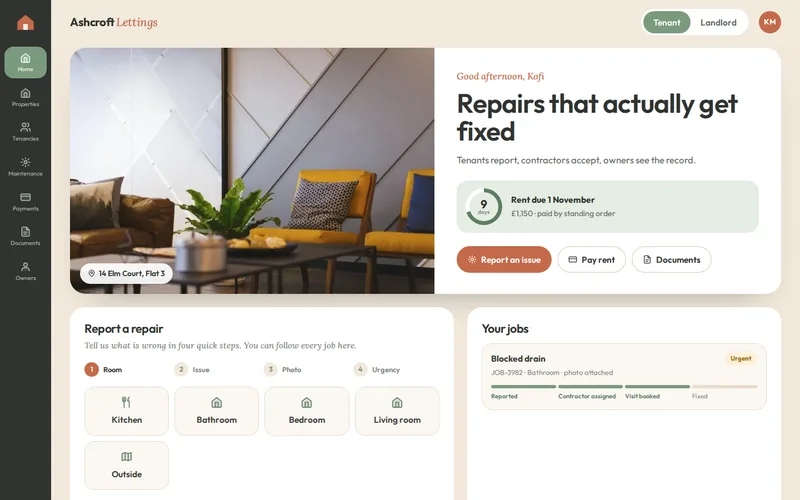
Photos do more than anything else. A picture of a dripping trap and a picture of water coming through a ceiling need very different responses, and the office can tell which is which without a visit. In the property management platform we built, reporting a repair follows this pattern in a few guided steps, with an optional photo, so reports arrive complete enough to act on.
Live Job Status Is What Stops the Chasing
People call when they are worried nothing is happening. The portal's most important job after the report is to show that something is. Each repair moves through clear stages, reported, assigned, booked and fixed, and the tenant sees each change without asking.
On that project, maintenance calls to the office dropped sharply once tenants could track jobs themselves, and average repair completion time fell by nine days. The faster repairs came from the contractor workflow and from finally having data on how long jobs took; the drop in calls came from visibility.
Two details make status useful rather than decorative. It must be updated by the people doing the work, not retyped by the office later, and a change should trigger a notification so the tenant does not have to keep checking. Those notifications have to arrive, which means sending email properly from the platform; our email deliverability work exists because "we sent it" is not the same as "they received it".
Contractor Access on the Same Record
Contractors are the other half of every repair, and offices often relay messages between them and tenants by phone. Giving contractors their own limited view removes the relay. In the platform we built, contractors receive jobs in their own view, accept them, book a visit and close them with photos and notes, and every step is time-stamped on the job's timeline.
Keep contractor access narrow: only their own jobs, and only what is needed to do them, such as the address, access notes and the tenant's photos, with nothing about rent or other tenants. The shared timeline also settles disputes. When an owner questions an invoice or a tenant says nobody turned up, the record shows what happened.
Rent Payments and Payment History
"Did my payment arrive?" and "how much do I owe?" are the next biggest group of calls in most offices. A portal that shows the rent schedule, payments received and any balance answers them directly. Taking card payments online, which the platform we built does through Stripe, turns paying a missed amount into a two-minute task instead of a phone call with card details read aloud.
Behind the scenes, payments must be matched to tenancies, arrears need a clear escalation path, and reminders should go out automatically before a payment is late rather than after. Our payment integration team handles the gateway side, including recurring payments where the business wants them.
Documents in One Place
Tenancy agreements, inventories, safety certificates, deposit details and building rules: tenants ask for these repeatedly, often at the moments that matter most, such as moving out. A documents area with the current version of each, available at any time, removes the request and the email with an attachment. For the office, storing certificates against each property has a second benefit: expiry dates can be tracked, and the system can warn well before a certificate lapses, as ours does for gas and electrical certificates.
Notices for Everyone at Once
When the water will be off on Tuesday, the lift is out or bin collection changes, one notice to every tenant in a building saves dozens of individual calls and messages. A notices feature lets the office post to one property, one block or everyone, shows the notice on each tenant's portal home page and sends it by email. Keep notices for things tenants need to know or act on; a portal that mixes marketing with water outages trains people to ignore it. Notices are not usually where a first release starts, but they are simple to add once tenant and property records are in place.
Make It Easy to Get In
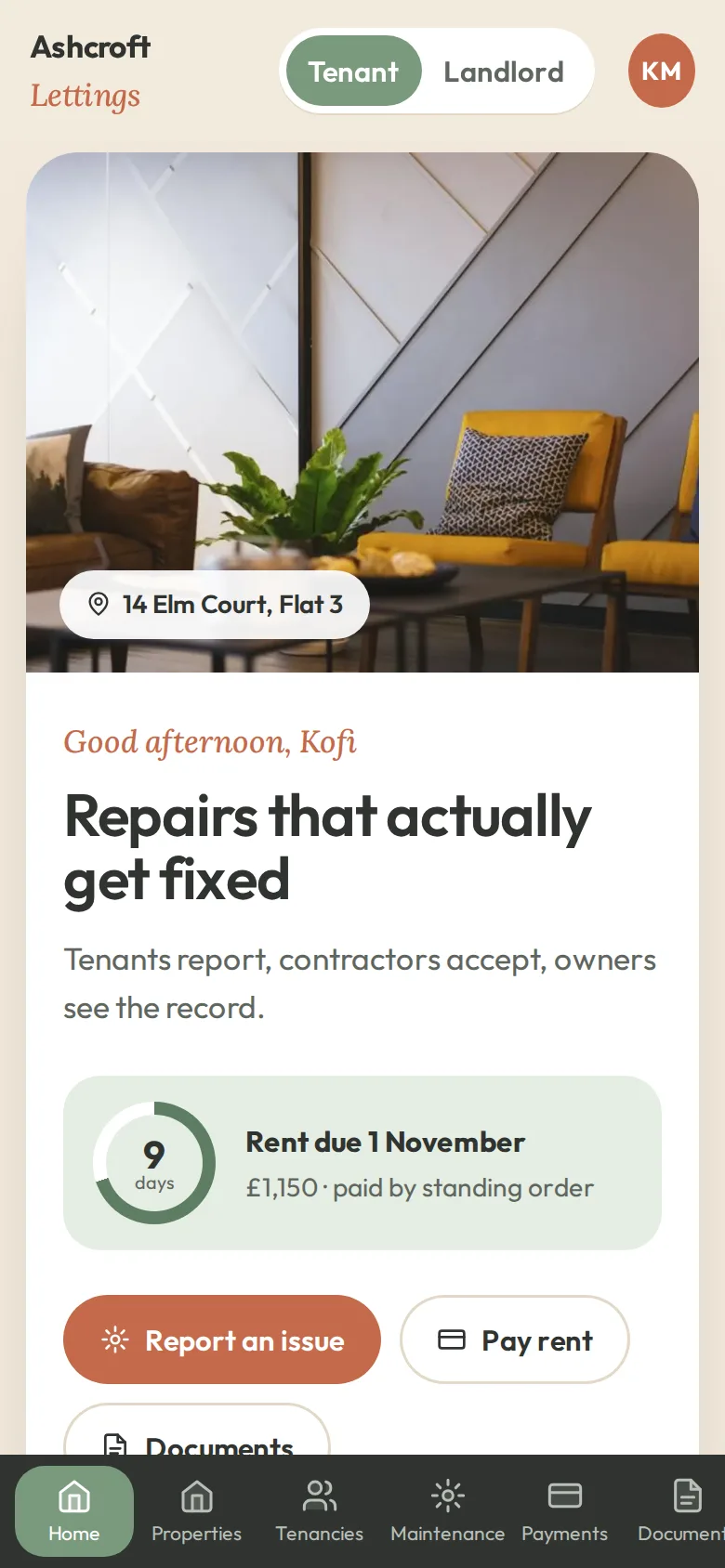
None of this helps if tenants cannot log in. Invitations should arrive by email with a link that sets a password in one step, the portal must work properly on a phone, because that is where photos are taken, and it should keep people signed in on their own device. Some clients also want it on the home screen like an app; a progressive web app gives that without an app store. On the project above, tenants and contractors were invited in stages and the office team trained on the new workflow, which kept the switch manageable.
Where to Start
Start with repairs, status and contractor access, because that is where the calls and delays are. Add payments and documents next, then notices. Our article on Laravel for business applications explains why we build systems like this on that framework, and our custom web development team can connect a portal to the lettings or accounting software you already use. To see what would make the biggest difference in your office, send us a rough tally of a week's call reasons; the top three are usually the first release.
Frequently Asked Questions
Will older tenants actually use an online portal?
More than managers tend to expect, provided it is simple. Most tenants already bank and shop on their phones, and the portal only has to do a few things well: report a repair, show its status, take a payment and hold documents. Keeping the phone line for those who prefer it, with staff logging calls into the same system, means nobody is left out.
Can a tenant portal connect to our existing lettings or accounting software?
Usually, if the software has an API or a reliable export. Typical connections sync properties, tenancies, rent schedules and payments, so the portal is not a second system to keep up to date by hand. Where no API exists, scheduled imports can bridge the gap. We review the systems involved before recommending an approach.
How do we stop tenants reporting emergencies through the portal and waiting for a reply?
Make the emergency route impossible to miss. The repair form should explain what counts as an emergency, such as a gas smell, a major leak or no heating in winter, and show the out-of-hours number before the form begins. Reports marked urgent can also alert the person on call straight away instead of waiting in a queue.
Is a tenant portal secure enough for personal and payment data?
It should be built to be. That means role-based access so tenants see only their own tenancy and contractors only their own jobs, encrypted connections, card payments handled by the payment provider so card numbers never touch your server, audit logs of who viewed and changed what, and regular updates. Laravel provides solid foundations for each of these.
How long does it take to build a tenant portal?
It depends on the scope of the first release and the systems it must connect to. A focused first version covering repairs, job status, contractor access and documents is a much smaller project than a full platform with rent tracking, owner statements and compliance reminders. We usually recommend releasing the repair workflow first and adding the rest in stages.