Mobile Apps
Ionic and Capacitor: Getting a Web App Into the App Stores
If you already have a web application, Capacitor can wrap it into real iOS and Android apps with native capabilities. Sometimes that is all you need.
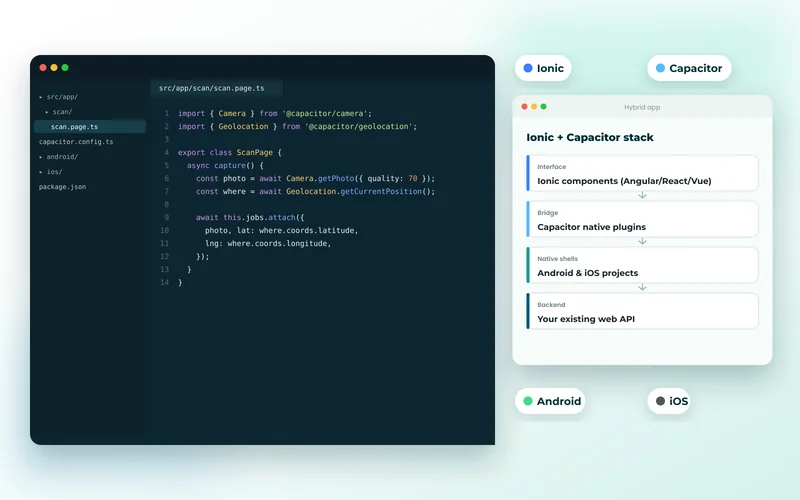
Capacitor takes a web application and packages it as a native app, with a bridge to device features. Ionic adds a component library that looks and behaves like native UI. Together they are the most direct route from an existing web codebase to something you can submit to the app stores.
What You Get
Your web application runs in a native shell with access to camera, geolocation, push notifications, filesystem, biometrics, contacts and the rest — through plugins rather than browser APIs, so you get capabilities the web does not expose.
You also get store presence, which is often the actual reason for the project. Customers who look for you in the App Store find you there.
Crucially, it is one codebase for web, iOS and Android. For a small team that is a significant saving, and it is why Ionic and Capacitor development remains a sensible option despite being less fashionable than the alternatives.
The Honest Trade-Off
It is a web view. Performance is good for forms, lists and content, and noticeably behind native for complex animation, large scrolling datasets and anything graphically demanding.
Users can sometimes tell. Scroll physics, keyboard behaviour and transitions are approximations. Ionic's components are excellent approximations, but an app that must feel indistinguishably native is not what this is for.
When It Is the Right Answer
- You already have a web application and need it in the stores without funding a second build.
- The app is forms, lists and content — most business and internal tools are.
- Your team writes web code and there is no budget to hire mobile specialists.
- Speed to market matters more than a perfectly native feel.
When to Choose Something Else
If the app is your primary product and its feel is part of the brand, invest in Flutter or React Native. If it needs heavy graphics or deep OS integration, go native with iOS and Android development. We compare the routes in Flutter vs React Native vs native.
Do You Need an App at All?
This deserves asking before any of the above. A progressive web app can be installed to the home screen, work offline and receive push notifications without a store listing, a review process or a developer programme fee.
If store presence is not a requirement, a PWA is cheaper and updates instantly. We go through the decision in PWA vs native apps, and we chose that route for a utility inspection field app where engineers needed offline forms rather than an app store listing.
Practical Notes
Two things catch teams out. First, store review: Apple rejects apps that are merely a website in a shell with no native value, so genuine device integration matters. Second, offline behaviour — a web view with no connection shows an error page unless you have designed for it, which means caching strategy from the start rather than as an afterthought.
And the app still depends on your API, which is where responsiveness is usually won or lost. Budget realistically using how much a mobile app costs.
Tell us what you already have and we will tell you the cheapest honest route to the stores — including when you do not need to be there.